What is WebMCP? How it works and why it matters for AI agents and your company
WebMCP lets a website hand tools to AI agents in the browser. What it is, how it works, which browsers support it, what it does for SEO and whether to build it now.
By Rabin Nuchtabek · Updated 2026-11-16 · 7 min read · For Builders, Marketers, Leaders
Part of What is a forward deployed engineer? The ultimate guide to becoming one in 2027
WebMCP is a browser feature that lets a website hand an AI agent a list of named tools, so the agent can call them instead of reading the screen and clicking. It is a draft, Chrome has it in a trial, and no assistant uses it for ordinary people yet.
This guide answers the questions people ask about it: what it is, how it works, why it matters for a company, who supports it, what it does for search and whether to build it now. Every fact was checked at its source on 13 November 2026. For the build itself, see how to add WebMCP to your website.
What is WebMCP?
WebMCP is a proposed web standard that lets a page register tools for an AI agent working in that browser tab. The agent calls a tool by name and gets an answer back, where today it has to read the page, guess which button does what, and click.
A tool is four things:
- A name, such as
search_products. - A description in plain language, so the agent knows when to use it.
- An input schema that says what the tool needs, such as a search term.
- A function that runs in the page and returns an answer.
This is tool calling, the idea assistants already use with their own tools, moved into the browser. The name comes from the Model Context Protocol, which does a similar job between assistants and servers. WebMCP borrows the idea and is a separate thing with its own rules.
How does WebMCP work?
A page registers its tools with the browser, an agent in the tab asks the browser for the list, and when the agent calls one, the page's own function runs and answers in text.
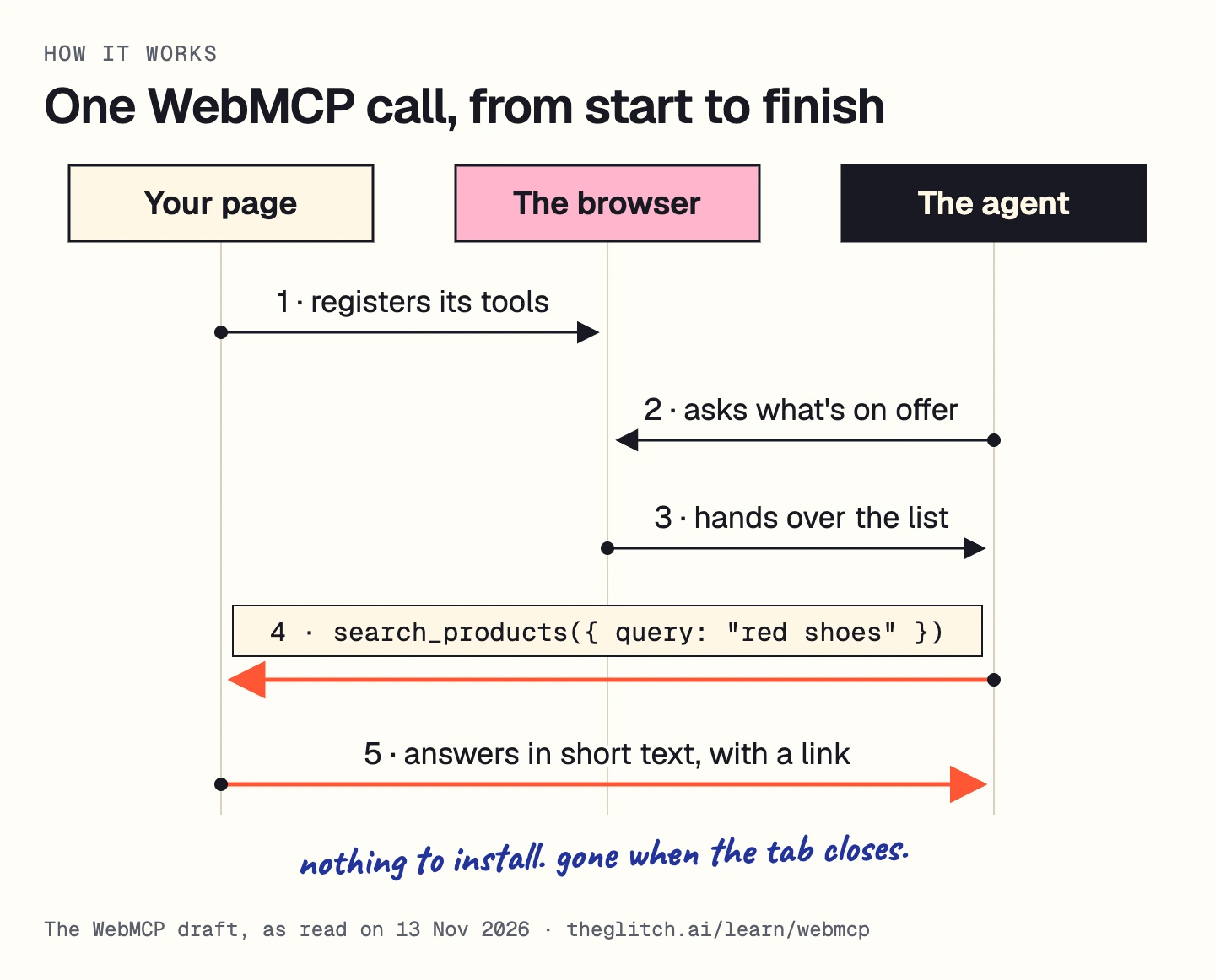
Step by step:
- The page registers its tools, one call per tool:
document.modelContext.registerTool(...). - The browser keeps the list. Tools belong to the page that registered them. By default, other sites and embedded frames from other sites cannot see or call them.
- An agent in the tab asks for the list, picks a tool by its description and calls it with input.
- The function runs in the page, inside the visitor's own session, and returns text the agent can use.
Nothing is installed. The tools exist while the page is open and go away when it closes.
Why does WebMCP matter for your company?
It matters because people have started sending agents to websites to look things up, compare options and fill in forms, and a site an agent cannot work is a site it leaves. The browsers that carry these agents are already here; this site keeps a list of them.
Three practical reasons to care:
- You decide what an agent can do. Without tools, an agent pokes at whatever it can click. With tools, it works from a list you wrote.
- A task takes one call. A lookup that costs a person several clicks, and an agent several guesses, becomes a single request with a short answer.
- You can see what agents ask for. Tool calls can be counted by name. Page views cannot tell you what a visitor was trying to do.
One honest limit: none of this pays off until assistants call these tools for ordinary users. Today that audience is developers and browser extensions. The reason to move early is to learn while mistakes are cheap.
Which browsers support WebMCP today?
Chrome is the only browser with WebMCP, as an origin trial that started in version 149 in June 2026. Firefox and Safari have not shipped it.
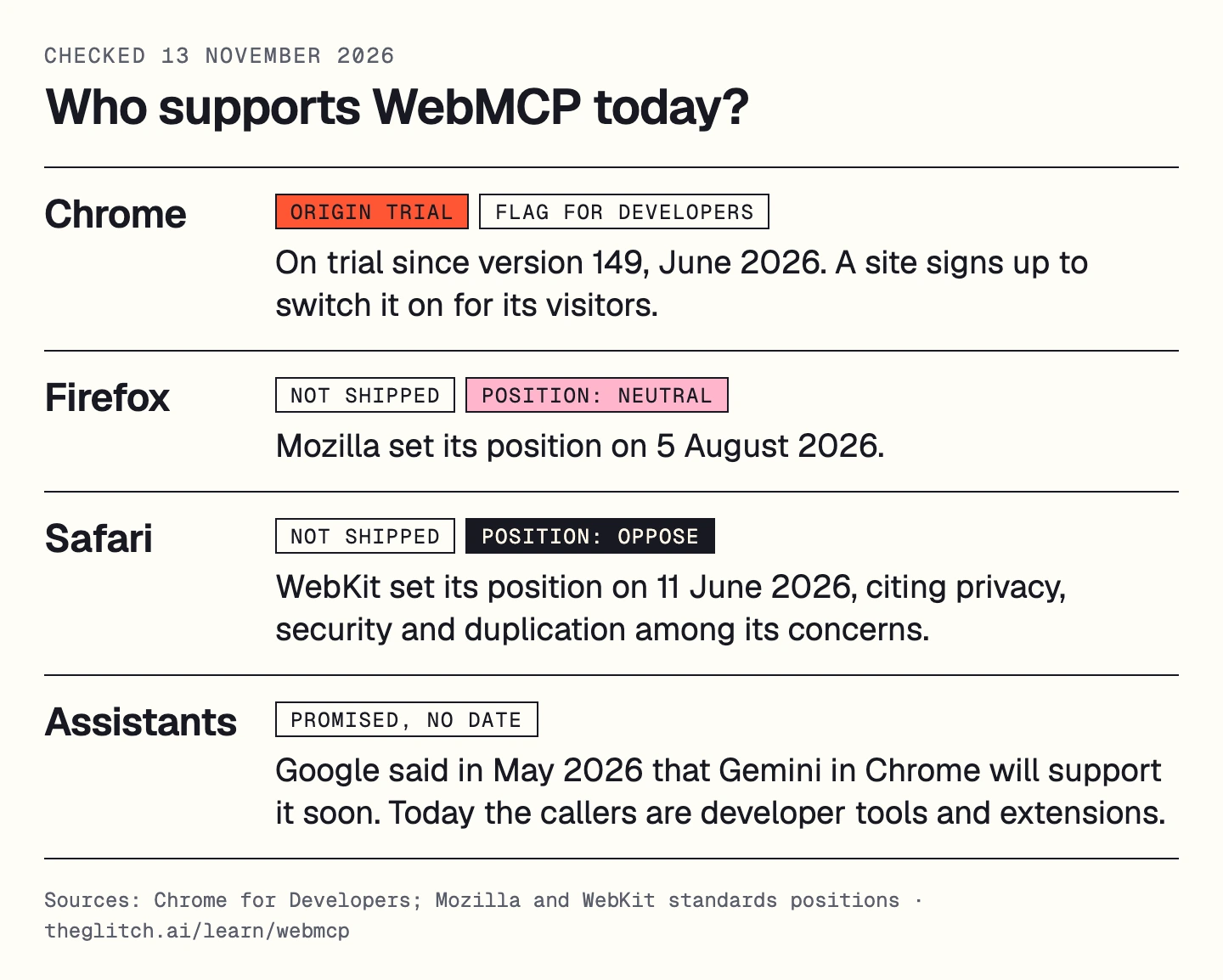
- It is a draft. The specification is a Draft Community Group Report from the W3C's Web Machine Learning Community Group, edited by engineers from Microsoft and Google. It is not on the W3C standards track.
- Chrome has it in a trial. A site signs up to switch the feature on for its own visitors. Developers can also switch it on locally with a flag.
- Mozilla's position is neutral, set on 5 August 2026.
- WebKit's position is oppose, set on 11 June 2026, with concerns that include privacy, security and duplication.
- Assistants are not there yet. The Chrome team said in May 2026 that Gemini in Chrome will soon support WebMCP, without a date.
So this is early. The design may still change, and it already has.
What changed since the early WebMCP guides?
The API changed, so most code written about WebMCP in early 2026 no longer matches the draft. If you are reading older material:
- The API moved from
navigator.modelContexttodocument.modelContext. provideContext,clearContextandunregisterToolare gone. A page takes a tool back by aborting a signal it passed in when it registered the tool.- The confirmation helper
requestUserInteractionis gone from the draft. A tool can mark itself as consequential, and the agent decides whether to ask the user first. - The form attributes
toolnameandtooldescriptionappear in Chrome's documentation and nowhere in the draft specification.
Check the specification's date before copying code from anywhere, including this page.
Does WebMCP help SEO or AI visibility?
No. There is no sign that WebMCP changes how a page ranks or whether an assistant cites it. Google's search documentation has no page on WebMCP, and its page on AI features says there is nothing extra to do to appear in AI Overviews or AI Mode beyond normal search practice. GitBook, which ships WebMCP on its documentation sites, says it does not change ranking.
What it does not do, in short:
- It does not bring agents to you. WebMCP helps once an agent is on your page. Whether an assistant recommends you in the first place is a separate job, covered in getting cited by AI.
- It does not make a bad page good. An agent without WebMCP still has to read your page. Google's checklist for agent-friendly sites starts with real buttons and links, labels tied to form fields, and a layout that does not jump.
- It does not replace consent. The draft says a site can describe its own tools wrongly, so an agent cannot rely on what a tool claims about itself. Tools that buy, book or send should stop at a step the visitor confirms. That is human in the loop, applied to a web page.
WebMCP vs MCP: what is the difference?
WebMCP puts tools in a web page for an agent using a browser tab. MCP puts tools on a server for assistants and coding agents that connect to it directly, with no browser involved. They solve the same problem in two places.
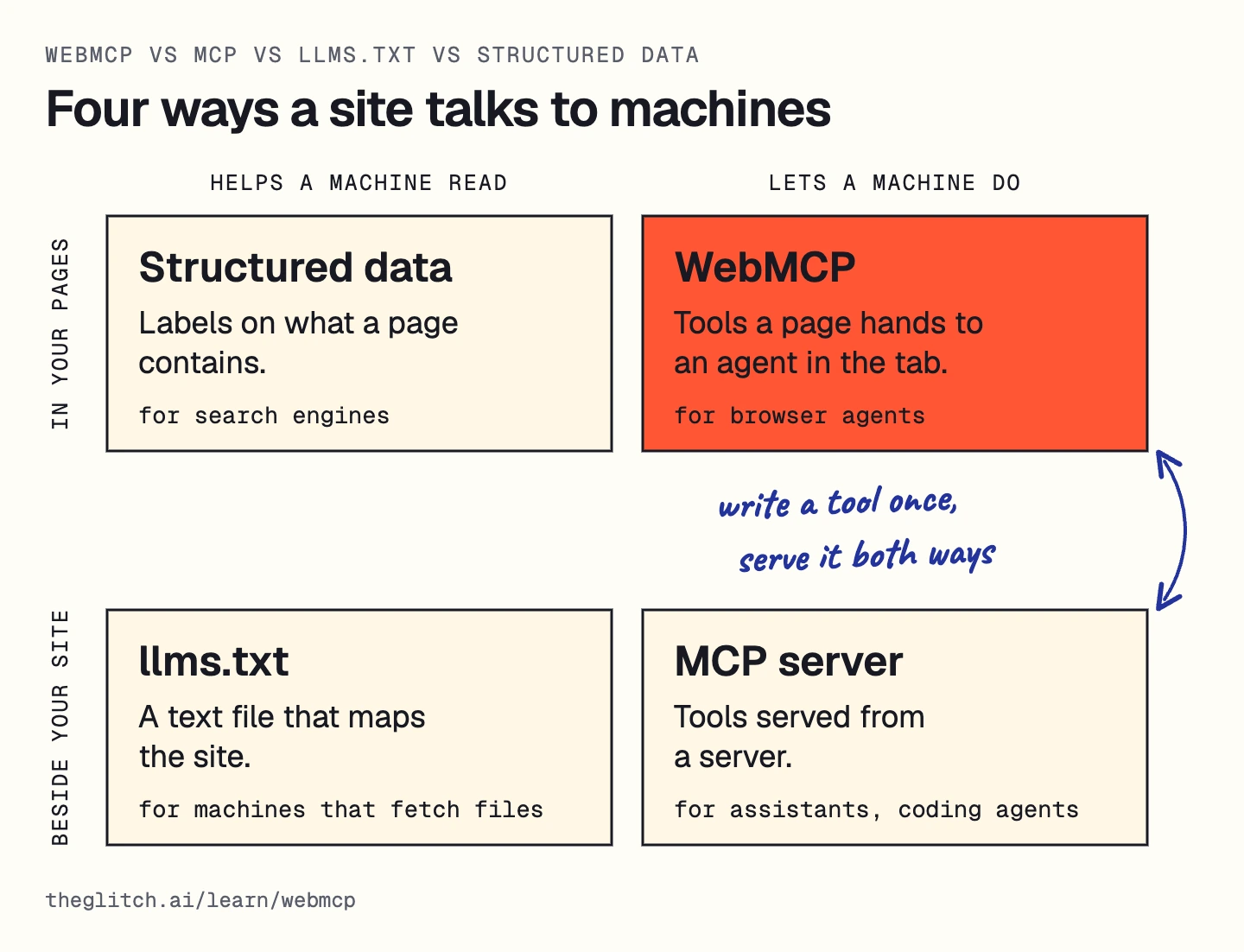
Two more things get mixed up with them:
- llms.txt is a text file that maps your site for machines that fetch files. Google says its search does not use it.
- Structured data labels what a page contains, so search engines can present it well.
WebMCP and an MCP server are about doing. The other two are about reading. A site can use all four, and a tool written once can be served through both WebMCP and an MCP server.
Should you build WebMCP now?
Build it now if your site has things to look up or do and you can spare a developer for a day or two. Wait if your site is a few pages of text, or if you need the traffic this quarter.
Build it now if:
- Your site has things to look up or do: a search, filters, a catalogue, a calculator, a booking or contact form.
- You have a developer for a day or two. A first set of read-only tools is small.
- You want to learn early how agents use your site.
Wait if:
- Your site is a few pages of text. An agent reads those fine already.
- You are counting on traffic from it this quarter. No assistant calls these tools for ordinary users yet.
- Your pages still fail the basics. Fix buttons, labels and layout first, because that helps every agent today.
A sensible first version is read-only: tools that look things up and return short text with a link. Leave anything that spends money or sends a message for later, behind a confirmation.
What does WebMCP look like in practice?
On this site it is nine tools: seven that look things up and two that act on the page. Anyone can run them by hand, which is the quickest way to see what an agent gets.
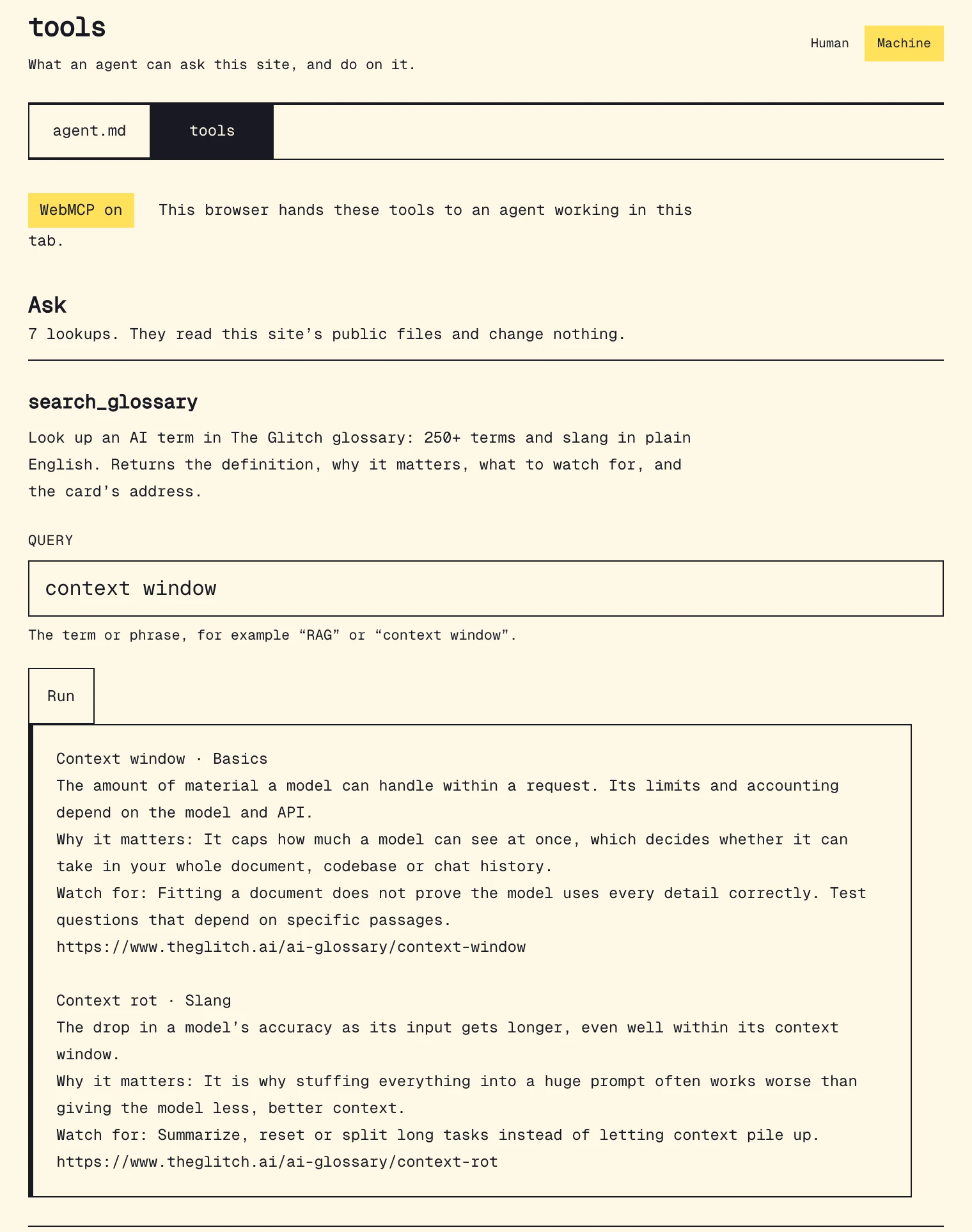
Try the tools, then take these six questions to your web team:
- What are the three questions people most often bring to our site?
- Can an agent answer each one today without clicking through several pages?
- Do our forms have labels tied to their fields, and real buttons?
- Which of those answers could be a read-only tool?
- Where would a tool need to stop and ask the visitor?
- How will we count tool calls without recording what people asked?
What's happening now
- The WebMCP draft changed again. The community group's draft now carries 13 November. Tools are registered on document.modelContext and taken back by aborting a signal. Older names such as provideContext are no longer in it. W3C Web Machine Learning CG
- MCP dropped its handshake and sessions. Revision 2026-07-28 of the Model Context Protocol made every request stand alone, with its version carried in the request. Small read-only servers became much simpler to run. Model Context Protocol
- Chrome opened the WebMCP origin trial. From Chrome 149, a site can sign up for the WebMCP origin trial and switch the feature on for its own visitors. Chrome for Developers
- Mozilla set its position: neutral. Mozilla, which makes Firefox, marked its position on the WebMCP proposal as neutral and closed the request. Firefox has not shipped it. Mozilla standards positions
- WebKit came out against the proposal. WebKit, the engine behind Safari, marked its position on WebMCP as oppose, with concerns that include privacy, security, duplication and the design of the API. WebKit standards positions
- Google: Gemini in Chrome will support it. In its round-up of I/O 2026, the Chrome team said Gemini in Chrome will soon support WebMCP APIs. It gave no date or version. Chrome for Developers
Fresh from This week in AI
| What it is | Who it is for | |
|---|---|---|
| WebMCP | Tools a page registers in the browser | An agent working in the tab |
| MCP server | Tools served from a server | Assistants and coding agents |
| llms.txt | A text file that maps the site | Machines that fetch files |
| Structured data | Labels on what a page contains | Search engines |
Questions people ask
What is WebMCP in simple terms?
WebMCP is a browser feature that lets a web page hand a list of named tools to an AI agent working in that tab. Each tool has a name, a description, the input it needs and a function that runs in the page. The agent calls a tool instead of reading the screen and clicking, which is faster and breaks less often.
Is WebMCP the same as MCP?
No. The Model Context Protocol connects assistants to tools that live on a server, with no browser involved. WebMCP borrows the idea for web pages: the tools live in the page and work only while it is open in a tab. A site can offer both, and one tool can be written once and served both ways.
Does WebMCP help SEO or Google rankings?
There is no sign that it does. As of November 2026, Google's search documentation has no page on WebMCP, and its guidance on AI features asks for nothing beyond normal search practice. WebMCP helps an agent use your site once it has arrived. Being found and recommended is separate work.
Which browsers support WebMCP?
Chrome has it as an origin trial from version 149, which opened in June 2026, and behind a flag for local testing. A site has to join the trial for its visitors to get the feature. Mozilla's published position is neutral and WebKit's is oppose, so Firefox and Safari do not have it.
Is WebMCP safe for my website?
A page's tools are private to that page by default, and they can only do what your own JavaScript lets them do. The risk is in what you choose to offer. Start with read-only tools, check every input in code, and make anything that buys, books or sends stop at a step the visitor confirms.
Will WebMCP still matter in 2027?
Nobody can promise that. It is a draft that has already changed its API once, and only one browser engine is trying it. The work underneath lasts either way: clean pages, clear names for what your site can do, and answers that fit in a short reply help every kind of agent, whatever the standard ends up being.
Key terms
Model Context Protocol · MCP server · Browser agent · Tool calling · llms.txt · Structured data · Human in the loop